Timer/Clock Issues – Bezzera Duo/Matrix V1

Disclaimer: The technical statements, support, information and recommendations contained herein are believed to be accurate as of the date hereof, but 1st-line Equipment, LLC does not make representations or warranties, express or implied, as to its accuracy, its completeness, or the results to be obtained. The information is being provided for informational purposes only and is intended for use by persons having adequate skill and expertise regarding the proper selection, use and application of the products and recommendations and at their own risk and discretion.

1st-line Equipment, LLC is not responsible for any injury or damages from such information. Please note that parts are available for purchase from 1st-line Equipment, LLC self service parts portal. These parts do not include any technical support. If you're unfamiliar with the technical aspects of repairing equipment, please contact a professional for proper evaluation.

By continuing to read further, you agree to abide by all the terms and conditions on this website. If you disagree, please leave our website.

The early versions of the Bezzera Duo / Matrix have a little bug in the software which makes the AUTO ON/OFF function not work properly.

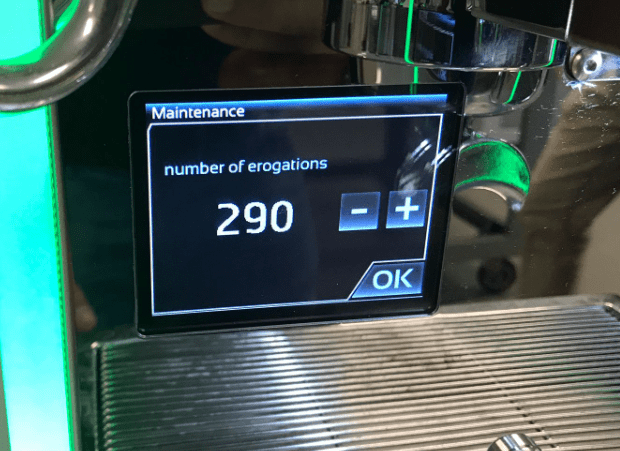
A quick fix to this is setting the value to the MAINTENANCE and WATER FILTER menu options to something other than zero.

Close-up of a Bezzera Duo coffee machine touchscreen displaying settings like temperature, pressure, and function icons. A blue gauge shows current readings, while shiny metallic parts frame the screen—perfect for tracking performance or troubleshooting timer issues. © 2025 1st-line.com
A digital display on a Bezzera Matrix coffee machine shows settings for lights (ON), sensor calibration, maintenance (0), and water filter, with a green-lit handle and stainless steel surface visible nearby. © 2025 1st-line.com
A Bezzera Duo coffee machine display shows Maintenance and erogations: 290, with minus, plus, and OK buttons. The metal drip tray is visible below the screen—a classic look for Bezzera Matrix owners experiencing timer issues. © 2025 1st-line.com
A Bezzera Duo coffee machine display shows Water filters with a 46-day timer, plus/minus buttons to adjust the count, and RESET COUNTER and OK buttons—helpful for managing timer issues easily. © 2025 1st-line.com

Please note the above information is subject to copyright. It cannot be published by any means without the expressed written consent of 1st-line Equipment, LLC.